
Git for Your
Database Schema
Track every table, view, function, trigger, policy, index, enum, and extension in PostgreSQL. Full history. Instant diffs. Safe deployments.
Works with any PostgreSQL database. Special Supabase integration included.
Everything You Need for Schema Version Control
From local development to production — one tool to track, diff, and deploy your database schema.
CLI-First Workflow
pull, status, deploy, diff, ci — manage your schema from the terminal with a familiar Git-like experience.
8 Object Types
Tables, views, functions, triggers, RLS policies, indexes, enums, and extensions — all tracked automatically.
Multi-Environment
Compare dev, staging, and production schemas side by side. See exactly what differs before deploying.
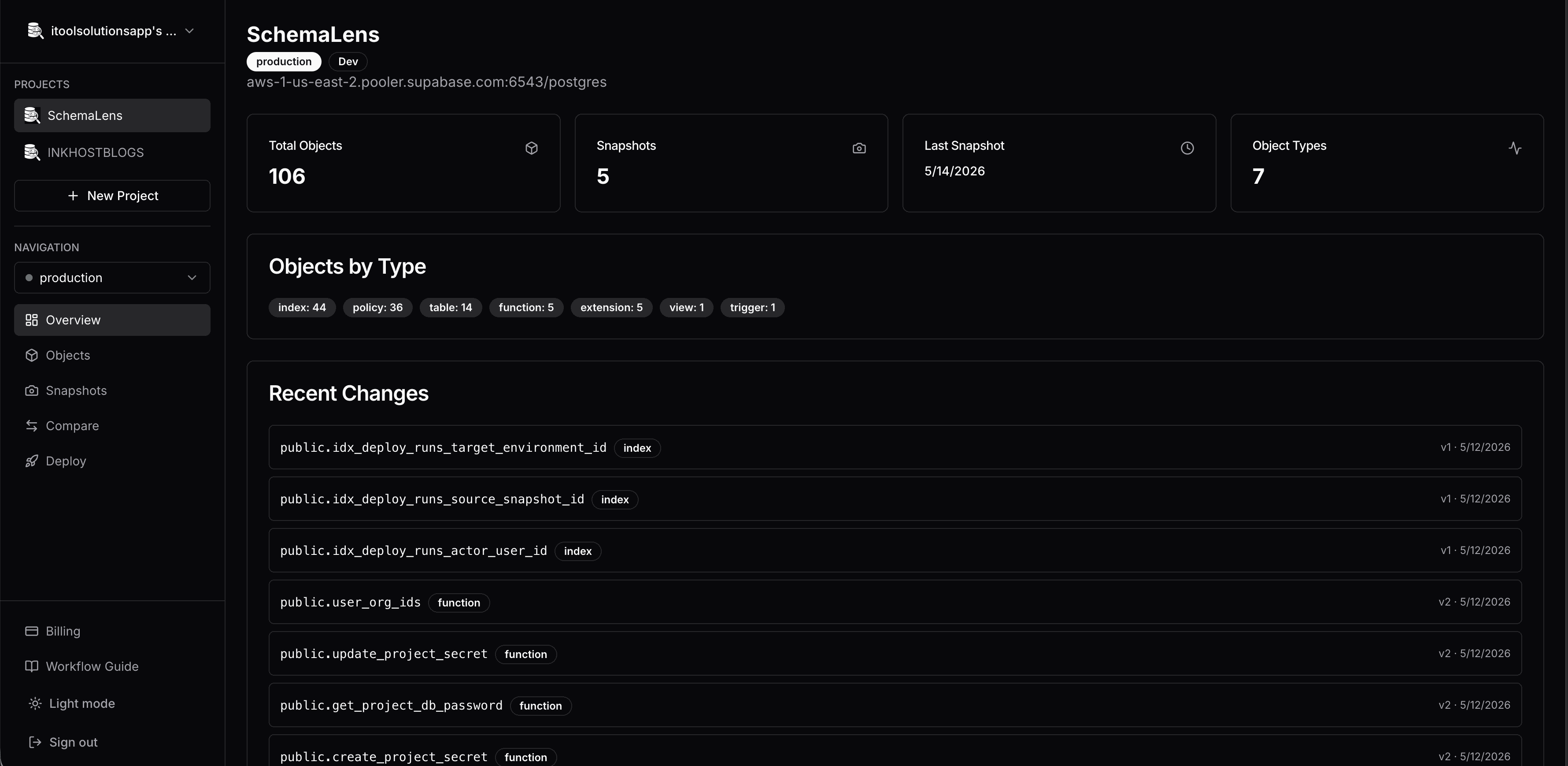
Visual Dashboard
Snapshots, object browser, and side-by-side SQL diffs with full version history at a glance.
CI/CD Ready
Non-interactive CI mode with --block-destructive flag. Integrates into GitHub Actions and any CI pipeline.
Safe Deployments
Dry-run by default, transactional rollback on failure, and automatic rename detection to prevent data loss.
PostgreSQL + Supabase
Works with any PostgreSQL database. Special one-click integration for Supabase projects.
Secure Credentials
Connection credentials stored server-side. Passwordless API key auth for CLI access.
How It Works
Three steps. That's it.
Connect
Point SchemaLens at your PostgreSQL database. Add credentials once — securely stored server-side or use environment variables locally.
Pull & Track
Run schemalens pull to snapshot your schema. Every object is written as a SQL file and tracked with full version history tied to git commits.
Diff & Deploy
Compare environments, review SQL diffs, and deploy changes with dry-run safety and transactional rollback. All-or-nothing migrations.
See It in Action
A familiar CLI that works the way you already think about schema changes.
$ schemalens pull --env production
Pulling schema from production...
  ✓ 12 tables
  ✓ 3 views
  ✓ 8 functions
  ✓ 4 triggers
  ✓ 6 policies
  ✓ 2 indexes
  ✓ 3 enums
  ✓ 1 extension
Snapshot saved: snap_20250405_001

$ schemalens diff --from staging --to production
Comparing staging → production...

  ~ tables/users        2 columns changed
  + tables/audit_log   new table
  - functions/old_calc  removed

3 changes found. Run 'schemalens deploy' to apply.
See every layer of your schema
A visual dashboard for the work you used to do by hand.
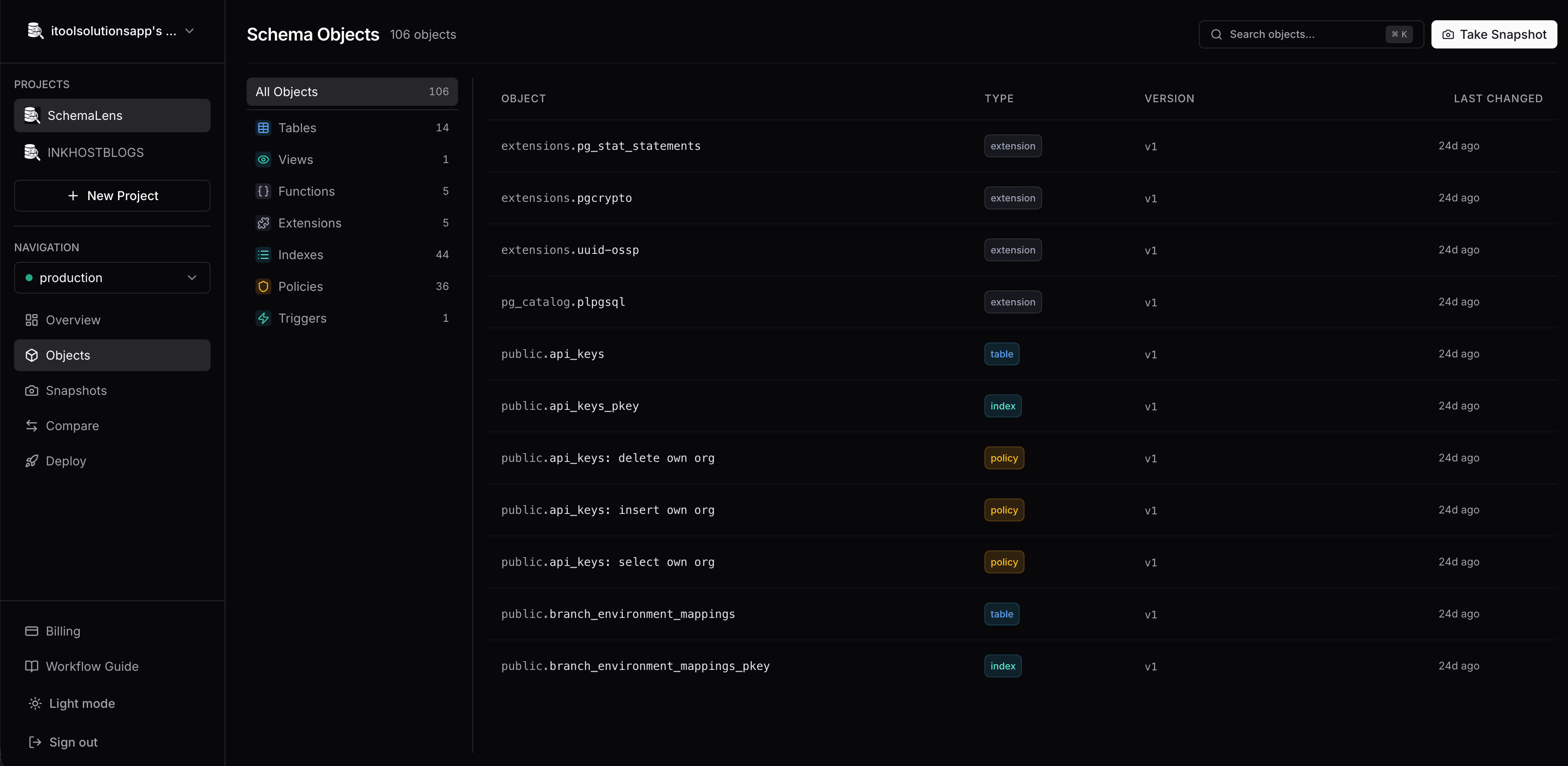
One view for every object
Tables, views, functions, triggers, policies, indexes, enums, extensions — filter by type, diff any version.
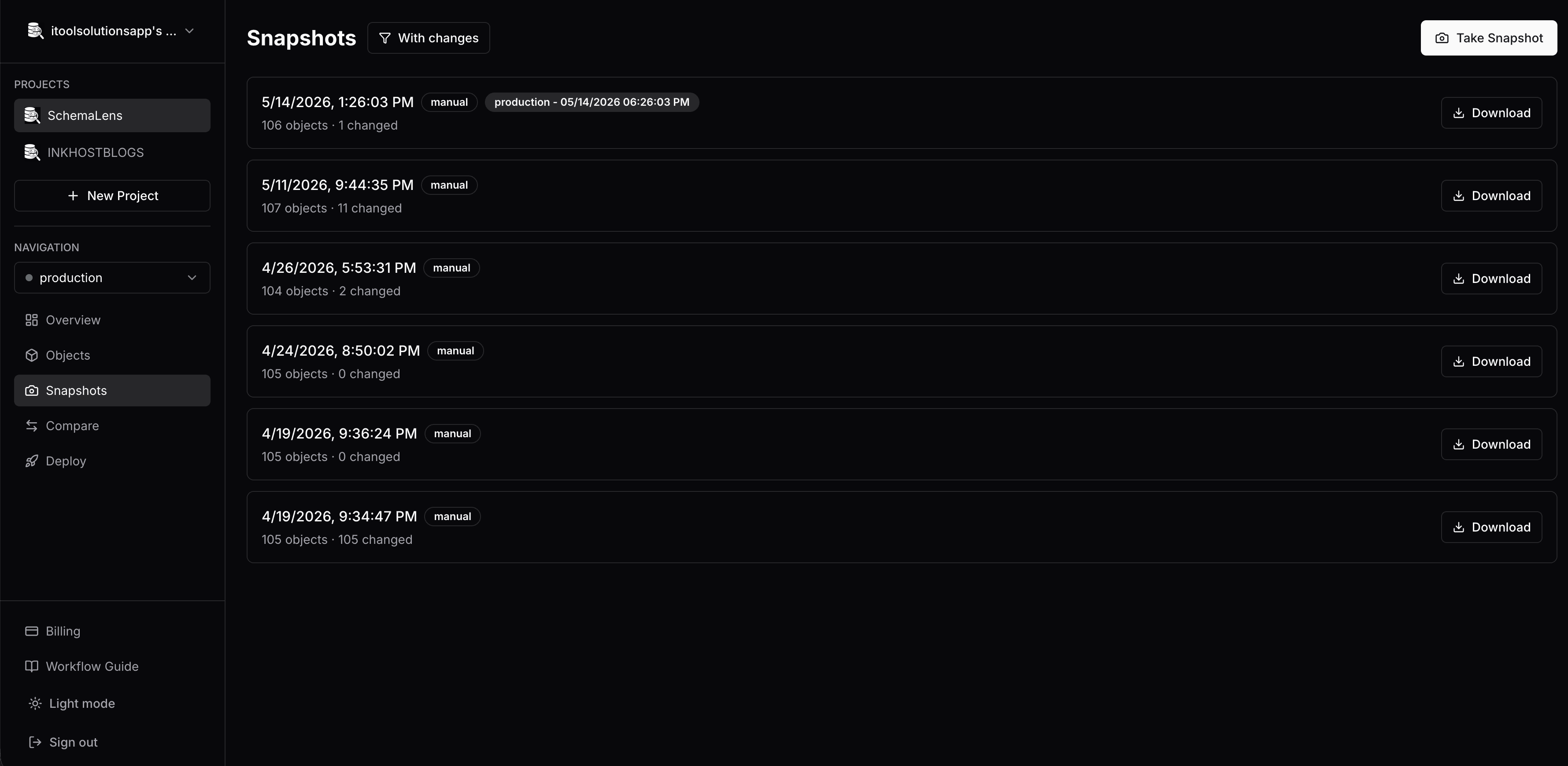
Time-travel your schema
Manual, CI, and PR-triggered snapshots with change counts at a glance.
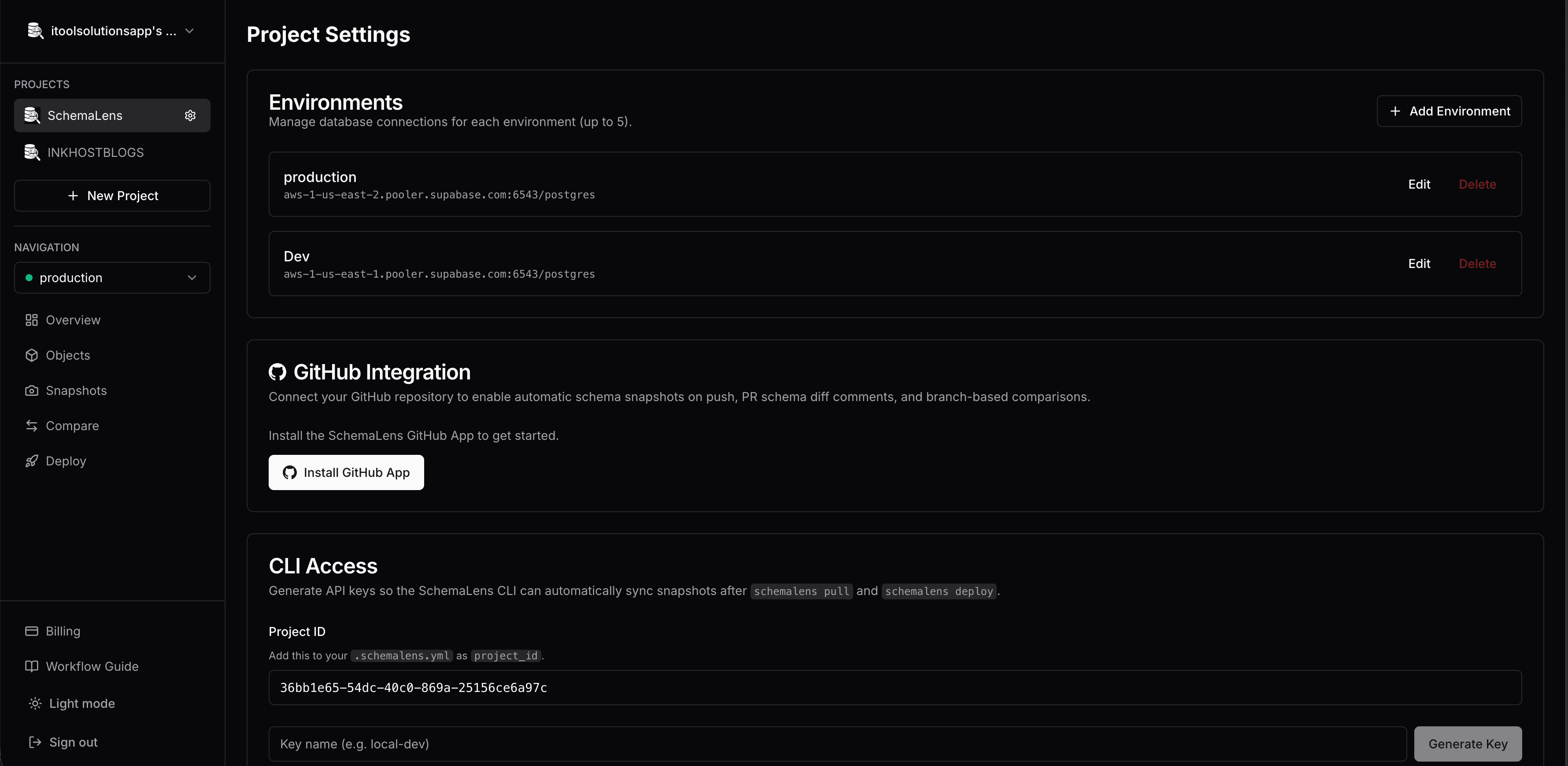
Connect once, deploy anywhere
Up to 5 environments per project. GitHub App for PR diffs. CLI keys for automation.
For AI Agents
Let your coding assistant manage schema changes. Two drop-in integrations for Claude Code, Cursor, Windsurf, and other agents.
Agent Skill
A single markdown file that teaches Claude Code when and how to run SchemaLens commands. Drop it into .claude/skills/ and your agent automatically picks up schema workflows.
MCP Server
Live tool access via Model Context Protocol. Agents can pull, diff, and inspect schemas directly — no shell required.
{
  "mcpServers": {
    "schemalens": {
      "command": "npx",
      "args": ["-y", "@schemalens/mcp"]
    }
  }
}Using Claude Code CLI? Start with the skill. On Claude Desktop, Cursor, or another MCP client? Use the server.
Pricing
Simple, transparent pricing for teams of all sizes.
Free
For individual developers
- 1 project
- 5 environments per project
- 1 team member
- 1 API key per project
- CLI access
- GitHub integration
- Migration & onboarding support
- Priority support
Pro
For growing teams
- Unlimited projects
- 5 environments per project
- 10 team members
- 10 API keys per project
- CLI access
- GitHub integration
- Migration & onboarding support
- Priority support
Team
For organizations
- Unlimited projects
- Unlimited environments per project
- Unlimited team members
- Unlimited API keys per project
- CLI access
- GitHub integration
- Migration & onboarding support
- Priority support
Frequently Asked Questions
What databases does SchemaLens support?
SchemaLens supports any PostgreSQL database, regardless of hosting provider. We also offer a special one-click integration for Supabase projects that auto-detects your connection details.
Do I need to change my deployment workflow?
No. SchemaLens works alongside your existing tools and workflows. The CLI integrates into CI/CD pipelines with a dedicated ci command, and you can block destructive changes automatically.
Is my database connection secure?
Yes. In linked mode, your connection credentials are stored server-side and never exposed locally. The CLI authenticates using API keys, and all communication is encrypted.
What schema objects are tracked?
SchemaLens tracks 8 object types: tables, views, functions, triggers, RLS policies, indexes, enums, and extensions. Each object is stored as a plain SQL file in your repository.
Can I compare different environments?
Absolutely. You can compare any two environments (dev, staging, production) side by side — both from the CLI and the visual dashboard with full SQL diffs.
What happens if a deployment goes wrong?
All deployments run inside a database transaction. If anything fails, the entire migration is rolled back automatically. Deployments also run in dry-run mode by default so you can review changes before applying them.
Start Tracking Your Schema Today
Sign in with GitHub to create your first project in seconds.